
How to Use ChatGPT for Blogging Step by Step (Beginner Guide)

Introduction
Let’s be honest for a second.
Starting a blog sounds easy… until you actually sit down to write. Then suddenly—no ideas, no structure, and you’re just staring at a blank screen.
Happens to almost everyone.
That’s exactly where learning how to use ChatGPT for blogging step by step can change things. Not magically, but yeah… it makes the process way less painful.
You don’t need to be a professional writer. You don’t even need perfect English. What you need is a system—and that’s what I’ll show you here.
By the end, you’ll know how to go from zero idea → published blog post without overthinking everything.
What is ChatGPT and How Does It Help Bloggers?
So first, quick clarity.
ChatGPT is basically an AI tool that helps you write, think, and structure content. That’s it. Nothing complicated.
But here’s where people get confused.
They think it writes perfect blogs automatically.
It doesn’t.
It helps you:
- Generate blog ideas
- Create outlines
- Write drafts
- Improve content
Think of it like a smart assistant… not a replacement.
If you understand how to use ChatGPT for blogging step by step, it becomes insanely useful. If you don’t, you’ll just get average content.
Why Beginners Should Use ChatGPT for Blogging
Honestly, if you’re just starting out, this tool can save you hours.
Not exaggerating.
Saves Time
Instead of thinking for 2 hours, you get ideas in 10 seconds.
Helps with Ideas
Writer’s block? Gone. Just ask and move on.
Easy to Use
No technical skills needed. Just type your question.
No Experience Needed
Even if you’ve never written a blog before, you can still start.
But yeah… one thing.
It won’t do everything for you. You still need to guide it.
Step by Step Guide to Use ChatGPT for Blogging
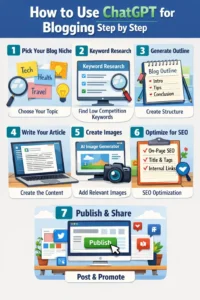
This is the main part. Don’t rush it.
If you follow this properly, you’ll actually understand how to use ChatGPT for blogging step by step, not just copy content.
Step 1 – Choose a Blog Topic
This is where most beginners mess up.
They pick random topics with no search demand.
Bad idea.
Instead, choose topics like:
- Make money online
- Gaming
- Digital marketing
- Tech
Or even better—go specific.
Example:
- “Best gaming phones under 20000”
- “How to start freelancing in India”
Clarity matters.
Step 2 – Generate Blog Ideas Using ChatGPT
Now this is where AI shines.
Use simple prompts like:
“Give me 10 blog ideas on digital marketing for beginners”
You’ll get instant ideas.
But don’t just pick anything. Choose something:
- People are searching for
- You can actually explain
That’s where smart blogging starts.
Step 3 – Create Blog Outline
This step is underrated.
Most people skip it… then struggle later.
Ask:
“Create a detailed blog outline on [your topic] with H1, H2, H3”
Now you have structure:
- Introduction
- Sections
- Flow
Honestly, once outline is ready, writing becomes 10x easier.
Step 4 – Write Full Article
Now you can finally write.
Use prompts like:
“Write a 1000-word SEO blog on [topic] in simple language”
But here’s the truth.
The output won’t be perfect.
Sometimes it feels robotic. Sometimes repetitive.
That’s normal.
Still, if you understand how to use ChatGPT for blogging step by step, you’ll know this is just a draft—not the final blog.
Step 5 – Edit and Make It Human
This is the most important step.
And most people skip it.
Big mistake.
You need to:
- Add your own thoughts
- Fix awkward sentences
- Break long paragraphs
- Make it sound natural
Because let’s be real—AI content without editing? It shows.
If you want your blog to rank, this step matters more than anything.
Best Prompts to Use ChatGPT for Blogging
Prompts are everything.
Bad prompt = bad output.
Here are some that actually work:
- “Write SEO friendly introduction for [topic]”
- “Generate long tail keywords for [topic]”
- “Rewrite this in human tone”
- “Make this content more engaging”
- “Add examples to this paragraph”
Don’t overcomplicate it.
Simple prompts work better most of the time.
Pros and Cons of Using ChatGPT for Blogging
Let’s not pretend it’s perfect.
Here’s the real picture:
| Pros | Cons |
| Fast content creation | Needs editing |
| Great for beginners | Can sound robotic |
| Helps with ideas | Not always unique |
| Saves time | SEO not perfect automatically |
So yeah… it’s powerful.
But only if you use it properly.
Common Mistakes Beginners Should Avoid
This is where most blogs fail.
-
Copy-paste without editing
Google doesn’t like that. Readers don’t either.
2. No SEO optimization
No keywords, no ranking. Simple.
3. Not adding personal touch
If your blog sounds like everyone else, it won’t stand out.
Honestly, learning how to use ChatGPT for blogging step by step is more about avoiding mistakes than doing everything perfectly.
Final Tips to Rank Your Blog Faster
Let me keep it real.
Ranking isn’t instant. But these things help:
- Use long-tail keywords
- Write at least 800–1500 words
- Add internal links
- Keep paragraphs readable
- Post consistently
And one more thing…
Don’t overthink perfection. Publish, then improve.
FAQs
1. How to use ChatGPT for blogging step by step for beginners in2026?
Start by choosing a niche, then ask ChatGPT for blog ideas. Create an outline, generate content, and edit it to make it human. Consistency matters more than perfection.
2. How do beginners write blogs using ChatGPT easily?
Beginners can use ChatGPT to generate ideas, outlines, and drafts. The key is to keep prompts simple and always rewrite the content in your own tone.
3. Is ChatGPT blogging good for beginners with no experience?
Yes, it’s actually one of the easiest ways to start blogging. You don’t need writing skills at first, but you do need to learn editing and SEO basics.
4. Why does ChatGPT content not rank on Google sometimes?
Because it often feels generic. Without editing, proper keyword usage, and real insights, AI content struggles to rank.
5. How to make ChatGPT blog posts more human and SEO friendly?
Add personal opinions, use simple language, break long paragraphs, and include real examples. That’s what improves readability and rankings.
6. Can I earn money with ChatGPT blogging in India?
Yes, through AdSense, affiliate marketing, and services. But results take time—usually 3 to 6 months if done consistently.
7. What is the best prompt for writing SEO blogs using ChatGPT?
A good example:
“Write a 1000-word SEO blog on [topic] in simple, human tone with headings and examples.”
Keep prompts clear, not complicated.
8. How many blog posts should I write per week to rank faster?
2–3 quality posts per week is a good start. Posting daily helps, but only if quality stays strong.
Conclusion
So yeah, that’s the real breakdown of how to use ChatGPT for blogging step by step.It’s not about letting AI do everything. It’s about using it smartly.
Start with ideas, build structure, write drafts, and then make it human.
That’s the process.
If you stick with it, your writing will improve… and your blogs will actually start getting traffic.
Just don’t wait for perfection. Start writing.